


Groove Masters - DJ Drum Pad
4.3128.00 Reviews
App Specs
- Version
- 0.202.34
- Updated On
- License
- Free
- Downloads
- 1,000,000+
- Developer
- Playcus Limited
- Categories
- Music & Audio
- Platform
- Android
Screenshots
 Analysis by AppCompare
I approach a music-making app with two questions: does it make experimenting feel inviting, and does it give me enough control to understand what I’m doing? Groove Masters - DJ Drum Pad aims to put beat-making within easy reach, using a phone as a place to tap out and layer rhythms. I see the appeal for someone who wants to play with musical ideas without beginning with a full desktop production setup.
A casual tool, not a complete studio
Published by Playcus Limited, this free music and audio app has a 4.4 average from around 6,000 ratings and has been installed over a million times. It is rated for Everyone, with in-app purchases ranging from under a dollar to around sixty dollars per item. That mix suggests a low-friction way to try it, but I would treat paid options as a reason to check what is included before committing to a longer session.
For me, the sensible expectation is a hands-on beat playground: a place to test a rhythm, try different sounds, and enjoy the immediate response of tapping pads. That is a different job from arranging a polished song in a full digital audio workstation. If I wanted detailed editing, dependable project handoff, or a carefully documented production workflow, I would compare it with a dedicated music-making tool instead of assuming a drum-pad app can replace one.
Trust starts with what I can actually see
When an app invites me to make and share music, I pay attention to the choices it shows me. I want to know when I am saving something locally, when I am sending it elsewhere, and what happens before I join a community or take part in a challenge. I would make those decisions deliberately rather than treating every sharing prompt as part of the beat-making process.
I also avoid guessing about privacy or permissions from an app’s general purpose. My practical habit is to read the device permission prompts when they appear and allow only what makes sense for the action I’m trying to take. If I am only exploring sounds, I do not need to rush into account or sharing choices just to see whether the basic creative experience suits me.
Making the first session useful
A helpful way to judge a pad-based music app is to start with a tiny musical task, not an ambitious track. I would pick one sound, tap a steady pulse, and then add only one contrasting part. That makes it easier to hear whether the timing and sound choices work for me, and it keeps a first experiment from turning into a clutter of layers I cannot easily evaluate.
For a quick everyday use, imagine waiting for a friend or taking a break between tasks. I could spend a few minutes trying a rhythm, save the idea if it feels promising, and return to it later rather than expecting to finish a full composition on a small screen. If the app’s available controls make that short loop of experimenting and revisiting comfortable, that is a real benefit; if I need precise arrangement or extensive editing, I would move to a more specialized tool.
Worth Reading Before You Choose

EA SPORTS FC Mobile 26 Is a Bigger Football Game, but It Takes Time

Flipboard Shows What News Apps Must Do Beyond the Feed

Switching to Android Auto Means Rethinking Your Driving Routine

Google Calendar Makes a Crowded Week Easier to Manage

Ludo King Makes the Most of the Minutes Between Plans

Baby Panda World Brings Quick Play to Modern Phones, but Its Game Library Feels Busy
The current version is 0.201.954, and the app supports Android 8.1 and later. Those details are useful when checking whether it fits an older device, but they do not tell me how it will feel on every phone. I would test responsiveness on the device I plan to use, especially before relying on it for a live session or a time-sensitive recording.
Getting into the Groove
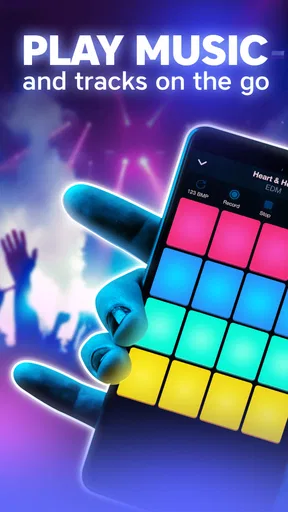
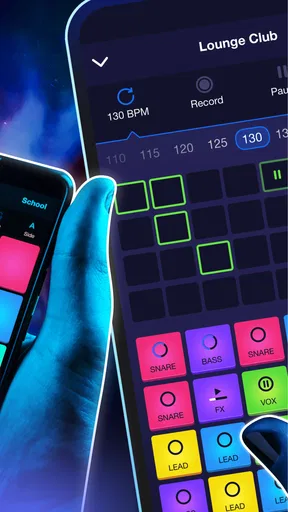
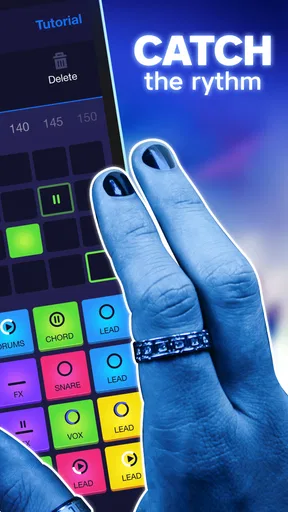
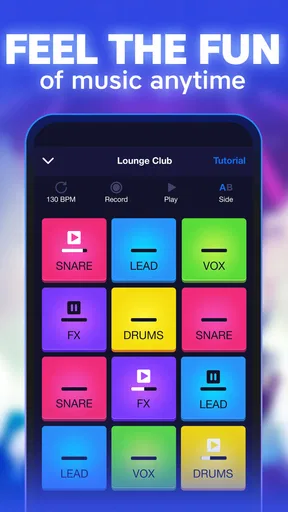
First things first, let’s talk about the interface. When you open Groove Masters - DJ Drum Pad, you're greeted with a sleek and intuitive layout. The design is minimalistic, which I love because it doesn’t overwhelm you with too many options at once. You have your drum pads laid out right at your fingertips, and each pad is customizable, allowing you to create sounds that fit your vibe.
One of the coolest features is the variety of sound packs available. Whether you’re into hip-hop, EDM, or even a bit of jazz, there’s a sound pack that'll resonate with you. The app frequently updates these packs, so there's always something fresh to experiment with. Imagine being able to switch from a chill lo-fi beat to an energetic trap mix in a few taps. It’s like having a whole music studio in your pocket!
Feature-Packed Fun
Now, let’s dive into what makes this app tick. The looping feature is a game changer. You can layer different sounds effortlessly, creating complex tracks that sound like they were made in a professional studio. For those of us who like to experiment, this is where the magic happens. You can loop a simple kick drum and gradually add hi-hats, claps, and synths, building a track that evolves over time.
The app also includes a recording function, which is a must-have. Made a beat you’re proud of? Hit record and share it with your friends or save it for later. It’s a great way to track your progress and see how your music develops.
Why You'll Love It
What I find truly engaging is the app's ability to cater to both amateurs and pros. If you're just starting out, the tutorials and user-friendly interface make it easy to pick up. But if you’re a seasoned beatmaker, the advanced features like effects and MIDI support will keep you entertained.
Moreover, the community aspect of the app is something that adds a unique touch. You can join challenges, share your tracks, and get feedback. It’s a wonderful way to connect with other music enthusiasts and grow your skills.
Room for Improvement
While there’s a lot to love, no app is perfect, right? Sometimes, I noticed a slight lag when loading new sound packs, especially if my internet connection wasn’t the best. It’s not a deal-breaker, but something to be aware of. Also, some of the more advanced features are hidden behind a paywall, which might be a bummer for those not looking to spend much.
That trade-off matters most if you are comparing it with free-form beat-making apps or a desktop workstation. A drum-pad layout encourages quick performance and playful layering, while a timeline-based editor is usually easier when you want to move individual sections, fine-tune a long arrangement, or keep many versions organized. I would choose this app for the pleasure of making sounds in the moment, not as my only tool for finishing a release-ready track.
A good fit depends on how you make music
I think it suits curious beginners who learn by touching sounds, casual creators who want a short creative break, and experienced musicians looking for a compact way to sketch an idea. The useful question is not whether someone is “good enough” to use it, but whether pads and loops match their way of thinking. If a rhythm comes to you as a pattern you want to tap, that format can feel direct. If your ideas begin with notation, chord charts, or precise editing, a keyboard-focused or arrangement-first app may feel more natural.
One practical workflow is to treat each session as a small experiment: choose a sound palette, build a short loop, record a take, and listen back before adding more. Listening back is important because tapping in real time can feel exciting even when the parts compete with one another. I would keep the first version simple, then change one element at a time. That makes it easier to hear whether a new sound improves the groove or merely makes it busier.
Another useful habit is to distinguish a saved idea from a finished project. A quick recording can preserve the feel of a rhythm, but I would not assume that a phone recording gives me the editing flexibility or project portability of a production workstation. If a sketch becomes important, I would keep a separate note of its tempo, sound choices, or arrangement so I can recreate the idea elsewhere if needed. This is a small step, but it prevents a promising moment from becoming hard to recover later.
Keep sharing and spending intentional
Community features can make practice less solitary, especially when a challenge gives me a prompt or a reason to try a style outside my usual habits. Still, sharing is a choice, not a requirement for enjoying a private experiment. I would first make a short recording for myself, decide whether I am comfortable posting it, and only then use any social option. That sequence keeps creative play separate from the pressure to perform for an audience.
I would take the same measured approach to purchases. The app is free to start, but optional purchases can add up across the available price range. Before buying anything, I would check what the specific item unlocks and whether I have already spent enough time with the basic tools to know it addresses a real need. A new sound or advanced control is worthwhile only if it helps me make the kind of music I actually want to make; paying just because an option is visible is not a good reason.
For someone who wants to use it around other people, headphones are a considerate choice when tapping through sounds in a quiet room or on public transport. I would also try a session in a calm setting before relying on the app in a noisy place: quick pad work depends on hearing how the layers fit, and distraction can make it harder to judge the result. These are simple adjustments, but they make short mobile sessions more enjoyable and useful.
Where I would draw the line
I would skip this as a primary choice if my goal were detailed multitrack production, exact control over every note, or a dependable setup for a performance where a delay would be costly. The mention of MIDI support may appeal to more advanced users, but I would verify that the particular workflow and equipment I rely on are supported before building a project around it. Likewise, a community and recording option are convenient, but they are not substitutes for a deliberate backup and production process.
There is also a difference between discovering a sound pack and having uninterrupted access to it. The occasional loading delay I experienced makes a stable connection worth considering when browsing packs, so I would explore and choose sounds ahead of a planned session rather than waiting until the moment I want to play. That does not prevent casual use, but it is a sensible workaround if I value a smooth start.
Final Thoughts
In conclusion, Groove Masters - DJ Drum Pad is a fantastic tool for anyone looking to dive into the world of music creation. It’s intuitive, fun, and packed with features that can turn any music lover into a budding DJ. Whether you’re killing time or seriously diving into music production, this app makes it all feel effortless.
So, if you’re ready to unleash your inner DJ, give Groove Masters - DJ Drum Pad a spin. Who knows, your next great track might be just a tap away!
My cautious recommendation is to try it for the kind of session it appears built to make enjoyable: a quick, hands-on beat sketch, a little loop experimentation, or a playful way to explore rhythm. I would keep expectations grounded, pay attention to the choices around purchases and sharing, and use a more specialized editor when precision or long-form production matters. With that distinction in mind, it can be a worthwhile pocket-sized creative outlet rather than a replacement for every music tool.
Pros
- Intuitive interface for beginners.
- Wide range of sound packs available.
- Responsive touch controls.
- Customizable beat patterns.
- Regular updates with new features.
Cons
- In-app purchases can add up.
- Limited free sound packs.
- Ads can be intrusive at times.
- No offline mode available.
- Requires significant storage space.
FAQs for Groove Masters - DJ Drum Pad
What is Groove Masters - DJ Drum Pad?
Groove Masters - DJ Drum Pad is an intuitive music creation app designed for both beginners and experienced musicians. It provides a virtual drum pad interface, enabling users to create beats and melodies using a wide variety of pre-loaded sounds and effects. The app is available on both Android and iOS platforms.
Is Groove Masters suitable for beginners?
Absolutely! Groove Masters is designed with user-friendliness in mind. It offers tutorials and an easy-to-navigate interface, making it perfect for beginners. The app provides step-by-step guides to help new users create their first tracks, while still offering advanced features that experienced musicians can explore.
Does Groove Masters require an internet connection?
No, Groove Masters does not require an internet connection for creating music. Users can access most of the app’s features offline. However, an internet connection is necessary for downloading additional sound packs and updates to enhance your music-making experience.
Can I export my music from Groove Masters?
Yes, Groove Masters allows users to export their creations in various audio formats. This feature lets you share your tracks on social media or collaborate with other musicians. You can save your compositions directly to your device or cloud storage for easy access and sharing.
Does Groove Masters offer in-app purchases?
While Groove Masters is free to download and use, it offers in-app purchases for additional sound packs and effects. These optional purchases enhance the user experience by providing more creative options, but they are not necessary to enjoy the core functionalities of the app.


